Thuraya SatSleeve for iPhone

Posted by Unknown Jumat, 19 April 2013 0 komentar

Application: iPhone 4, 4S
Function: Satellite/iPhone communications
Rating:****
Cost: App Free, sleeve $499.00


Wow, there is a new way to stay globally connected with you iPhone 4 or 4S. A new device called the SatSleeve turns an ordinary iPhone into a satellite phone.  The present model fits the iPhone 4 and 4S but the iPhone 5 version is reportably in the works. The Thuraya SatSleeve App only lets you set up and use your satellite phone to make voice calls and text messages at this time.  Thuraya also plans to release a SatSleeve with data capability later this summer.

Features:
  • iPhone 4 and 4s compatible
  • Bluetooth connectivity
  • 12 languages
  • Voice Calls
  • SMS text
  • Battery backup 2400mAh
  • Emergency Call button
  • Coverage in 140 countries, 2/3 of the earth

Your phone simply inserts into the case and is transformed into a satellite phone.  The app pairs through Bluetooth to connect to the sleeve.  The case contains a satellite antenna and a 2400mAh battery that can also be used to recharge you iPhone.

The sleeve itself has an SOS button that can be programmed to make an emergency call to whoever you want.  The Thuraya network cover 140 countries around the world but you will notice that North and South America are missing from the coverage map.

The app shown at left links with your contacts and allows you to make calls or text your friends. The SatSleeve is easily paired to your phone.  Take the back cover off of the SatSleeve and press the pairing button on the bottom.  On your phone go to the Settings menu and turn Bluetooth "ON". The SatSleeve selection should be shown. Once it automatically pairs to your phone you will not have to pair it again.

For you world travelers this may be the ticket. Total freedom from landlines and spotty cell coverage.  The $499 dollar price tags seems pricey, but compared to a bulky satellite phone costing $600-$1500 it is a nice solution.  A $99.00 per year pre-paid calling plan has rates from 99 cents to $1.49 a minute. It is not cheap but that is the price of world wide service.

I am bummed out that they do not cover the Americas. Must be a licensing issue or something.  I can only hope that it will be offered in our area at sometime in the future.


Baca Selengkapnya ....

Resident Evil 6 - REPACK 5.50 GB only

Posted by Unknown 0 komentar
Resident Evil / Bio-Hazard 6 - REPACKED 5.50 GB Only


Resident Evil 6


Blending action and survival horror, Resident Evil 6 promises to be the dramatic horror experience of 2013. Resident Evil favorites Leon S. Kennedy, Chris Redfield and Ada Wong are joined by new characters, including Jake Muller, to face a new horror, the highly virulent C-virus, as the narrative moves between North America, the war-torn Eastern European state of Edonia and the Chinese city of Lanshiang.

Starting with three distinct, yet interwoven story threads, each with their own pair of protagonists for either solo or co-op play, both offline and online, not only will Resident Evil 6 deliver both different perspectives and gameplay styles but, with the introduction of the innovative Crossover mechanic players will be able to team up and share the horror. At key moments during the game, up to four players can join together online to tackle a specific situation, with some stages seeing the usual partnerships swapped to further increase the depth of gameplay.

Once players have completed the initial three campaigns they will unlock an all new campaign featuring Resident Evil’s very own femme fatale, Ada Wong. A single player experience, Ada’s campaign features unique missions, gameplay and weapons which will provide answers to the unanswered questions from the first three campaigns.

Key Features

Horror on a global scale – No longer confined to a specific location, the outbreak of the C-virus is worldwide with the action taking place in North America, Eastern Europe and China The most expansive Resident Evil game to date- Experience the horror through four distinct yet intertwined campaigns:
Crossover Gameplay – Not only does each story cross paths, but so does the action – At significant points when the narrative draws pairs of characters together, the all new Crossover mechanic allows up to four players to experience the horror together online
Solo or co-op play – Resident Evil 6 delivers both single and two player co-op gameplay either offline or online (however Ada Wong’s campaign is one player only)
New threats on the rise – Confront the results of the C-virus in all its varied and deadly forms including zombies, J’avo, Chrysalids, and much more Agent Hunt Mode – In this all new online mode for the Resident Evil series, experience the action from the other side. As a ‘hunter’, join the enemy side to become one of the game’s zombies, J’avo or other C-virus mutations and infiltrate another active game session to eliminate the human characters.
Play your way – Use skill points to upgrade your character to provide faster reload speed, improved firepower or increase your health bar with the Character Skill system
Redesigned control system – Resident Evil 6 features an evolved control system allowing players to shoot while moving; slide; roll in any direction and to take cover along with the addition of an enhanced melee attack
Mercenaries returns – Players will once more be able to enjoy the highly popular Mercenaries Mode
Localized voice over – Resident Evil 6 will include fully localized voice over in English, French, German, Spanish and Italian as well as subtitles in Japanese, Russian, Polish, Brazilian and Portuguese.


Title: Resident Evil 6

Genre: Action
Developer: Capcom
Publisher: Capcom
Release Date: Mar 22, 2013
Language: English


Password for RAR - www.skidrowgames.net

Baca Selengkapnya ....

Age of Empires II HD - REPACK 742.88 MB only

Posted by Unknown 0 komentar
Age of Empires II HD - REPACKED (Only 743 MB)


Age of Empires II - HD Edition


In Age of Empires II: HD Edition, fans of the original game and new players alike will fall in love with the classic Age of Empires II experience. Explore all the original single player campaigns from both Age of Kings and The Conquerors expansion, choose from 18 civilizations spanning over a thousand years of history, and head online to challenge other Steam players in your quest for world domination throughout the ages. Originally developed by Ensemble Studios and re-imagined in high definition by Hidden Path Entertainment, Microsoft Studios is proud to bring Age of Empires II: HD Edition to Steam!


Title: Age of Empires II HD
Genre: Strategy
Developer: Hidden Path Entertainment, Ensemble Studios
Publisher: Microsoft Studios
Release Date: Apr 9, 2013
Languages: English

Age of Empires II HD – REPACK – 742.88 MB

DOWNLOAD

Password for RAR - www.skidrowgames.net

Baca Selengkapnya ....

Resident Evil 6 update 1.03 - Reloaded - Steam Version

Posted by Unknown Kamis, 18 April 2013 0 komentar
Resident Evil 6 Update 1.03 - Reloaded - Steam Version


Resident Evil 6 - Update 1.03 Reloaded / Steam Version


Title: Resident Evil 6
Genre: Action
Developer: Capcom
Publisher: Capcom
Release Date: Mar 22, 2013
Languages: English*, French*, German*, Italian*, Polish, Portuguese-Brazil, Spanish*, Russian

Resident Evil 6 Update 3-RELOADED
361 MB

Download - Official Site

Baca Selengkapnya ....

Video Game Developer with Dyslexia Creates Interactive e-Book for Young Readers

Posted by Unknown Minggu, 14 April 2013 0 komentar
It has been a busy week at Brennan Innovators after having participated in two educational conferences here in St. Louis. At these two events, we met with so many adults and children who described their symptoms and challenges with dyslexia.

Also during the past seven days, we have had the great privilege of interviewing an experienced and accomplished video game developer whose company is much in the news right now. Joe Booth is the Executive Producer and Creative Director of Vidya Gamer, LLC, a company that takes concepts used in making video games "to re-imagine learning.” Currently, Joe and his company are working diligently on a project that will incorporate the concepts learned in video game development and apply them to an exciting and uniquely interactive e-book for young readers. Joe Booth also is upfront about the fact that he has dyslexia.

Joe’s 25 years’ experience in traditional video game development includes work with major industry franchises such as FIFA, Need for Speed, Ghost Recon, and Rollercoaster Tycoon. Joe has held senior production and creative roles at Microsoft, Electronic Arts and Ubisoft. While at Microsoft, Joe established Microsoft KODU as the leading game-based learning platform.

More recently, Joe founded Vidya Gamer in order to focus full time on transforming the games and learning space into a meaningful commercial sector. His clients include the Gates Foundation, Achieve3000, the Pearson Foundation and OutThink, Inc.

With all of these impressive achievements, you might be surprised to learn that Joe has dyslexia. As a young student, he struggled significantly with spelling, composing thoughts for writing, and had “bad handwriting.” His teachers attempted to help him with exercises and “remedial” spelling activities that provided no real assistance for Joe. In fact, this contributed to even more confusion about spelling and writing. At about age 11 or 12, Joe began to feel disengaged and started “skipping school.” It didn’t take long for this to become a chronic issue.

At the same time, Joe had always had significant strengths and talents in other areas. Math and science were subjects where he excelled, which is not unusual for individuals with dyslexia. During the summer of that same year, Joe’s parents bought him his first computer, which became the tool that would enable him to fully use his talents and gifts in a very productive way---making computer games. These games were “his thing”, and he began to teach himself how to program in order to create them himself. Amazingly, at age 15, a company offered him a contract to create a computer game for the marketplace.

In his 20s, Joe did not do much reading for leisure. During that time, he re-visited books attempted in his earlier years, such as Winnie the Pooh and Alice in Wonderland, and experienced some success. Then he read A Prayer for Owen Meany by John Irving. This novel portrayed a character with dyslexia who used a piece of paper to help him read. Reading Irving's book and identifying with this dyslexic character was a turning point for Joe.

Joe Booth realized after reading this novel that he could use his strengths to solve problems. Even though he had always been challenged with spelling and writing, he could use his problem-solving skills and other talents while cutting and pasting letters and other symbols to write programming code for the creation of exciting video games.

Today, Joe and Vidya Gamer are putting all their efforts into developing an interactive e-book that will help provide more background knowledge for young readers while allowing them to interact with the digital text, creating a story with outcomes they choose. In taking on this project, Joe Booth and his company will be making a major contribution to literacy for young people. This e-book, written in the spirit of Indiana Jones and the Choose Your Own Adventure books, will engage its readers and involve them in the unfolding story.

Currently, they are in the final days of raising funds for this e-book development via Kickstarter.com. To view the video about the e-book efforts or to contribute to this literacy project, just visit http://kck.st/15Q4Mlz. If funds manage to exceed the goal amount for the project, the extra funding will be used to reach the company’s “stretch goals”, which are to create additional versions of the book for different reading levels. A pledge of just $5 will allow a donor to receive a digital copy of this very first e-book from Vidya Gamer on the day of release (estimated delivery---May 2013).

Joe Booth has certainly demonstrated that even with the challenges of dyslexia, it is more than possible to use one’s other strengths and talents to manage some of the dyslexic symptoms and solve problems, especially while promoting and contributing to literacy. He believes the mention to others that one is affected with dyslexia "let's the pressure off" and allows one to be more able to function successfully. He also wants others to know that those with dyslexia are not unintelligent. In fact, many have unique gifts that enable them to compensate for the dyslexic symptoms. Joe's unique talents and gifts will certainly help young readers learn to love reading again. We want to wish all the best of success to Joe and Vidya Gamer, LLC with Codename: A FOR ADVENTURE!

Resources

National STEM Video Game Challenge
http://stemchallenge.org/experts/joe-booth/

Kickstarter Campaign Page---For more info or to make a contribution to the Vidya Gamer e-book project
http://kck.st/15Q4Mlz

Company Website for Vidya Gamer, LLC
vidyagamer.com

For information on customizable reading tools:
www.FocusandRead.com Tools for struggling readers of all ages!
www.BrennanInnovators.com Info & support for struggling readers
314-892-3897

Image courtesy of: http://osxdaily.com/2011/06/04/black-white-ipads-and-iphones/

Baca Selengkapnya ....

Easy Tips for “Too Much Text!”

Posted by Unknown Minggu, 07 April 2013 0 komentar
Focus Strategies for ADHD, Dyslexia & Other Issues

Is your child overwhelmed each time a new written assignment is due? Do you have one or more students in your classroom who can’t seem to finish a math worksheet---or any worksheet, for that matter? Well, perhaps the issue is not a lack of motivation, but in the fact that there is just too much printed text or content for them to process. So, what should you do to help?

This was one of the problems mentioned most often at a very recent educational conference we attended here in St. Louis. Again and again, we offered some simple tips to parents and teachers wanting to help children FOCUS and READ with more success.

This week in our blog article, we thought it might be a good idea to provide just a few of the ideas offered to those at the conference. These tips can make work much more manageable, especially for children and teens with AD/HD or dyslexia who sometimes say, “There’s just too much text!” We hope you’ll find them simple yet helpful for your child or students who need help with focusing and for those times when there is “just too much text.”

Focus and Reading Tips for Too Much Content

1. Fold worksheet into sections so only content needing immediate attention is visible.
-Fold so that only 1 paragraph/question/portion of the worksheet can be viewed at a time.
-With math worksheets, fold paper into fourths (or even eighths) so that only 2 problems (or even 1 problem) can be seen.
-When the content section has been read, question answered, or problem(s) completed, re-fold for the next section or problem(s), etc. until all work in the assignment has been completed.

2. Cut worksheet into meaningful sections.
-Cut worksheet so each cut section contains only 1 paragraph or 1 question.
-Cut math worksheets so each part will contain only 2 problems (or 1, if needed).
-Then, in sequential order, staple all sections together at the upper, right-hand corner.
-As each section is read or completed, tear off that section and set it aside. The student will feel like he is making progress with each “tear-off” and the sense of being overwhelmed will melt.

3. Use simple tools to help break up the content into manageable parts.
-Use a ruler placed below each line of text that is to be read. This will place emphasis on the reading matter needing immediate attention. Move the ruler down the page as each line is read.
-Use a piece of colored paper or cardstock to place under lines of content about to be read, covering all text or problems yet to be given attention. This will provide emphasis on what needs immediate attention.
-Use graph paper to properly align math problems into correct place holder columns.
-Use a customized, cut card or the Reading Focus Cards to isolate 1 or 2 lines of text and block out a significant amount of surrounding text. For some math problems, turn the card 90 degrees to isolate place holder columns, allowing only the one column of numbers needing to be added, etc. at the moment.

For information on customizable reading tools:
www.FocusandRead.com Tools for struggling readers of all ages!
www.BrennanInnovators.com Info & support for struggling readers
314-892-3897

Image courtesy of: http://www.kidslearningstation.com/math/math-help-worksheets.asp

Baca Selengkapnya ....

SEAiq 2.5 Revision

Posted by Unknown 0 komentar

Application: iPhone 3,4,5, iPad, iPod Touch iOS 6.0
Function: Marine GPS Navigation and Charting
Rating: ****
Cost: SEAiq USA $9.99, Free version, SEAiq Open $19.99

Mark Hayden, the author of the SEAiq series of apps, has been very busy lately. He has not only sailed more than 15,000 miles this past year but also has made many valuable additions to his SEAiq charting app.  I originally reviewed the SEAiq USA app back in April of 2012.

Mark and his growing family arrived back at their boat in Australia with an added crew member this year.  Their son joined them as they spent many months exploring the coasts of Australia and eventually moving on to Southeast Asia.  Concerns about pirates forced them to cross the Indian Ocean and onto South Africa.  The last leg of their trip was from South Africa to Cape Verde where the boat will remain until baby number 2 arrives shortly.  They plan to continue their adventures in the Mediterranean. Congratulations Mark and Dana!

You can follow all of their travels on their Northfork blog.

Mark's many ocean miles have given him a unique perspective on what features are valuable for crossing oceans as well as coastal cruising.  He happens to be an accomplished sailor and a very talented programmer.  This combination has produced one of the best charting apps on the market today.

The latest additions to SEAiq have added more functionality to the already feature rich app that is becoming the Go-To-App by many boating enthusiasts and harbor pilots. The variety of features and the versatility to display just about any type of chart make it a must have app.

Features:
  • NOAA ENC Vector
  • NOAA Raster charts 
  • US Army Corps of Engineers vector chart of inland waterways
  • For SEAiq Open formats include, KAP and BSB formats, S-57, S-63, Inland-ENC, CM93, and KAP/BSB plus home-made charts generated from satellite imagery
  • Offline use of charts
  • Night time color modes
  • ActiveCaptain points of interest
  • On screen instrument display
  • iPad vertical instrument display 
  • LAT: Latitude, LON: Longitude, ACC: Horizontal Accuracy of current GPS fix, COG: Course Over Ground, SOG: Speed Over Ground, BTW: Bearing To Waypoint, DTW: Distance To Waypoint,VMG: Vector Made Good
  • English and metric units
  • Import/Export
  • Detailed Vector chart information
  • Waypoints creation and edit
  • Route creation and edit
  • Tracking
  • Smooth chart quilting
  • World chart view
  • Multi-touch gestures, pan and zoom 
  • NMEA WiFi instrument and AIS data
  • AIS display
  • Weather Grib downloads from the Internet or Saildocs via Sailmail
  • Wind, pressure isobars
  • Anchor Alarm
  • 7 Day evaluation period
  • Drag and drop Variable Range Markers
  • Drag and drop Electronic Bearing Lines
Mark continues to add many useful features to an already great app. He makes it easy for you to try the app with his Free version. All the features of the app are available for 7 days.  The premium features are colored a light magenta so you know what you get when you purchase the upgrade.

The premium features will no longer be available after the 7 day trial period.  They do allow you to un-install the app and reinstall it for another 7 days if needed.


Chart Types:

SEAiq has a very wide range of charts that can be displayed.  Unlike most charting apps many of the charts can be downloaded and updated for free.  For SEAiq USA and SEAiq Free, both raster and vector charts and updates can be downloaded free from NOAA within the app.  Vector charts for inland waterways published by US Army Corps of Engineers are now available too. The app allows you to switch back and forth between displaying the raster or vector types of charts.  The Raster setting in the settings menu will switch the viewed charts between Vector and Raster.


For the SEAiq OPEN version, you can load charts in the KAP and BSB formats. SEAiq OPEN now supports formats including S-57, S-63, Inland-ENC, CM93, and KAP/BSB.  Many of these can be downloaded from the Internet and imported using the Open In feature. Support also includes home-made charts generated from satellite imagery.  This is useful for areas that do not have good chart coverage. The OPEN version is free to download and with an in app purchase of $19.99 it will upgrade to the premium version with all the features.  No other app allows you to download and use so many different chart types.

Mark provides links to many free S-57 chart sources within the app's help screen. (See below). Help for downloading other types of charts is also explained nicely within the app.

NOAA provides high quality charts of the USA and territorial waters:
http://www.charts.noaa.gov/ENCs

The US Army Corps of Engineers provides charts of some inland waterways in the USA (in both S-57 and Inland ENC formats):
http://www.tec.army.mil/echarts/E_download.html

Numerous charts of inland waterways in Europe. Below are some of the links. Note that these links change from time to time:
Austria: http://www.doris.bmvit.gv.at/fileadmin/group_upload/8/ECDIS_Download/Edition_5.zip
Belgium: http://ris.vlaanderen.be/IENC/
Czech Republic: http://193.86.76.109/lpm/maps_S57.asp?lang=en
Germany: http://www.elwis.de/RIS-Telematik/Inland-ENC-der-WSV/IENC-Dateien/index.php.html
Netherlands: http://www.vaarweginformatie.nl/fdd/main/infra/enc
Romania: http://www.afdj.ro/electronic_map.html
Serbia: http://www.plovput.rs/elektronske-navigacione-karte
South China Sea (requires registration): http://scsenc.eahc.asia

Status Bar:

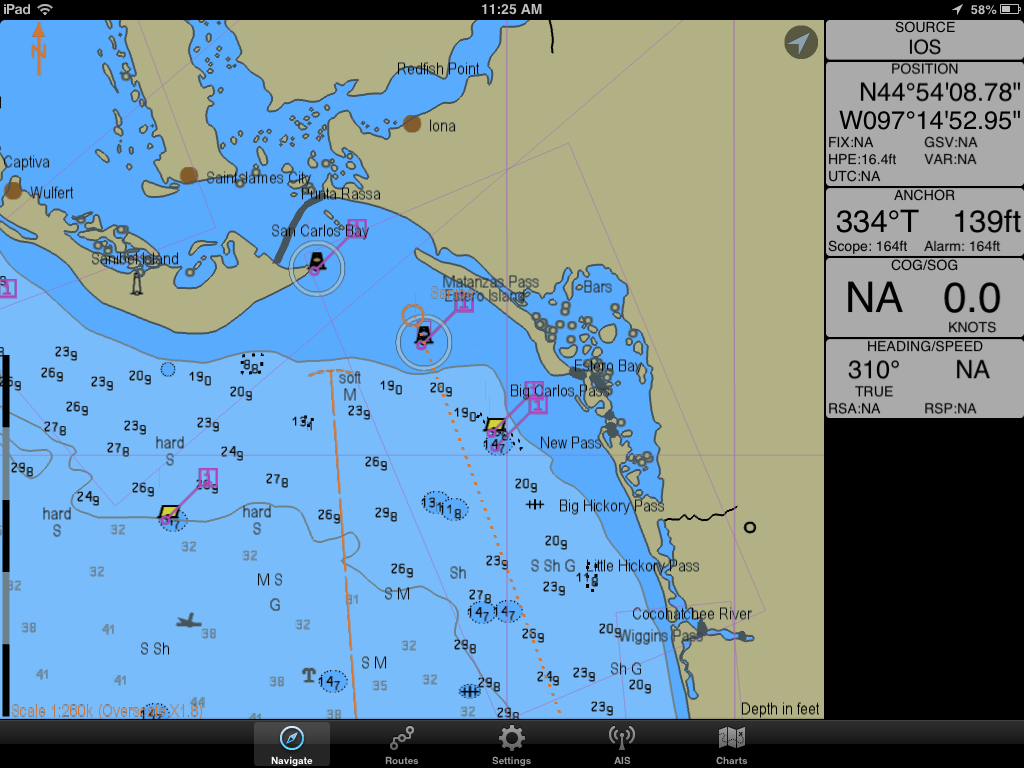
Another new addition to the app is the Vertical Status Bar.  This is available for iPad versions when in landscape mode.  When you rotate the app into landscape mode the status bar will move from the top of the display to the side of the display.   The data is now organized into more logical groups for display.  The GPS position and senor data is separated and shown on top.  The SOG and COG readings are displayed using a bigger font which makes them stand out and easier to read.

Context-sensitive information is also displayed when certain features are turned on so you only see the data when it is useful to you.  When the anchor alarm in enabled, the information about relative position of the anchor is displayed. When AIS is being used, information for the most recently selected target is displayed.


VRL/EBL:

Variable Range Markers and Electronic Bearing Lines are some new tools added for measuring distance and bearing.  These can be added to you chart by simply double tapping at any point and making a selection.  The VRM tool allows you to specify a distance around your present location or a point. A circle is then displayed at that radius.

EBL can be made from any point on your chart to another point or location.  It will display the bearing and distance between the two points.  This feature is nice to quickly find distance and bearing from your own-ship or even to an AIS target. These can be dragged and dropped onto or off of a vessel.

 
Weather:

One of the latest additions to SEAiq is the weather data including Wind, Pressure/Isobar data.  It has the ability to download this data automatically from the National Weather Service. An Internet connection is required. This latest release adds the pressure/isobar lines.  The weather data can also be downloaded manually while underway via SailMail/SailDocs using your SSB.  Additional weather data is planned for future releases.  The settings menu in the Weather sections lets you control what data you want to see and how it is downloaded.


SEAiq continues to add many functional and desired features for mariners.  The app has matured over the past year to become a full featured marine charting app. The latest features including Active  Captain POI, additional chart types, import/export, weather, instrument data, EBL, VRM, AIS, anchor alarm, and NMEA WiFi capability make it a must have for you iPad.   

~~~ Sail On ~~~ /)
Mark


Baca Selengkapnya ....
Trik SEO Terbaru support Online Shop Baju Wanita - Original design by Bamz | Copyright of android jelly bean update.