Install CM11,Paranoid,OmniRom on Android Smartphone/Tablet

Posted by Unknown Selasa, 24 Desember 2013 0 komentar
This time we'll talk about CyanogenMod, OmniRom and Paranoid Android, custom roms that are based on the source code that Google sends to AOSP project.

CyanogenMod

One of the most popular, famous and expected at the scene,CyanogenMod is one of the changes that have longer hovering on the scene and has more versions. While the ease of installation is a major advantage that has this modification between Roms Android has a lot of features that makes it one of the best, especially in that squeeze the most power of smartphones and tablets are installed.

  • Support for native threads.
  • Support audio codec FLAC.
  • Long list of Access Point Name.
  • OpenVPN client.
  • Menu reboot improved.
  • Support for Wi-Fi, Bluetooth and USB thetering.
  • CPU overclocking.
  • Soft Buttons and other changes of tablets.
  • Toggle on sliding notifications.
  • Manager permits Android Apps .
  • Graphical improvements.

With all these advantages is more than obvious why is that CyanogenMod is one of the most famous in the scene and if you have a compatible smartphone with huge list of support having the group, especially a Samsung Android , you can certainly enjoy these advantages.

OmniROM

This particular is one that, although new, was born after the team CyanogenMod decided to become a private company and lost his fame as a rom open source, which reason that several independent developers who helped with Android Apps , Mods Android or Android Widgets , join and create this Rom.

It is so OmniROM for Android , with almost the same features of CyanogenMod , but with the addition of being open source and there are more developers who are helping to make it more popular and has more features in each nightly or stable release, what turns out to be more than good to install on your device option, taking some of the compatibility with smartphones / tablets most famous scene.

Paranoid Android

Another Android Roms to find the name of Paranoid Android is one of the least fame has in the scene between the three, but not one that is not that good. As striking point seems to be the ability to modify the aesthetics of the operating system at home and can easily change things as little absurd and influential as themes and colors. Although their main disadvantage also find the lack of development in the latest features and integrated applications, because unless they are a successful team of developers does not seem to give much importance as the other groups. But still a highly recommended to enjoy some visual customization oriented ROM.

Paranoid Android only officially supports the Google Nexus as Nexus 4, Nexus Nexus 7 and 10 , but can find no official support for other devices on XDA Forums.
How to install Android ROMs:
If you want to know if your device is compatible with any Rom and also how to install Roms on your Smartphone or tablet, just share the article.

How to install

Root + Custom Recovery :

If you have a media device or a high-end manufacturer like Samsung, LG, Sony Mobile, Motorola, HTC etc, you will not have many problems in power rootearlo and install a recovery.

The problem occurs in Chinese smartphones or tablets,copies of which are similar and whether the hardware is not, so the same process used in the original model does not support copy and have to resort to Several processes have access to super user and install a recovery.

To install a custom recovery the best options are:  ClockworkMod Recovery and TWRP Recovery .

Baca Selengkapnya ....

How to fix Error 498 on Google Play Store-Solutions

Posted by Unknown Minggu, 22 Desember 2013 0 komentar
Sometimes when we try to download apps from Google Play get unexpected errors that may have multiple causes.


One is the Error 498,which does not give many clues about its origin. Is summarized as " Error 498 has occurred while was communicating with the server." To resolve this error there are several ways, you have to keep trying until something works for you.

Method 1: Removing temporary data

Go to Settings (or options) >> Applications

  • Select "All" tab

Find Google Play Store

  • Remove Data
  • Clear Cache

Give back and now seeks Google Play Services

  • Remove Data
  • Clear Cache

Reboot your phone and try again to download your application

Method 2: Removing Gmail account

Go to Settings >> Accounts >> Google

  • Delete your Google account
  • Reboot your device

Login to Settings >> Accounts >> Google

  • Make your account again

Try again to download your application

Method 3: Using the Factory Reset

If neither of the first 2 methods worked, you can try to make a Factory Reset .

This is done as follows:

Login to Settings >> Backup and Restore

  • Factory Reset
  • Reset Device

Expect Android do its work, the phone will reboot.
Return to start

If any of these three methods will be served (or some other method), leave it in the comments.


Baca Selengkapnya ....

Minimize your Files Size with FileMinimizerSuite7.0

Posted by Unknown Sabtu, 21 Desember 2013 0 komentar
FileMinimizerSuite7.0: Sending files over the internet is a little tedious thing when it comes to send large files having lot of space on the Hard disk. Fileminimizersuite7.0 is an awesome software which do minimizing your file about 90% according to its software developers. This software does not change the content but only reduces its size so it can be send easier through internet. However FileMinimizerSuite7.0 supports certain file formats to be compressed or minimized following are those supported file formats. 


Supported File Formats in FileMinimizerSuite7.0

  1.  PDF.
  2. JPG, PNG and TIFF.
  3. Excel documents
  4. Microsoft word documents.
  5. Lotus notes.
  6. Notepad Notes.
  7. Zip.
  8. Powerpoint documents.
  9. High compressing capability
  10. Minimum system requirements.
  11. 100% free on our blog
Download Fileminimizersuite7.0 for Free
http://filehippo.com/download_fileminimizersuite/download/cb08e59af84857f9f0277e76b063c0e4/

Baca Selengkapnya ....

Trace Your Lost or Stolen Windows Phone

Posted by Unknown 0 komentar
Windows Phone smartphones also are growing and turning into common these days. As we tend to all grasp that Nokia Lumia series is one among the foremost hit and palmy series that works on Windows phone package. Another factor is that the Windows phones are very costly and that’s why it’s our duty to shield them from thieves or spatial relation. So, if you've got lost or stolen your Windows smartphone, you don’t ought to worry as a result of with the assistance of this text you’ll be able to find your lost smartphone in seconds.


Locate your Windows Phone Easily


There is and anti-theft feature of Windows phone named Find My Phone which enables you to locate your lost or stolen Windows phone. To do so, you just need to follow below steps.

  1.  First of all, Visit the Windows Phone official  website.
  2. Now, move the cursor to Explore My Phone and Select Find My Phone from the drop down menu.                                    
  3. Now, Sign in with your live Windows Phone ID which you have ever used with your smartphone.

When you sign in to your existing Windows Phone account, it will show the location of your lost windows smartphone on the map immediately. You can also print the a copy of the location if you want.

Baca Selengkapnya ....

AquaMaps US HD

Posted by Unknown 0 komentar
Application: Requires iOS 6.0 or later, iPhone, iPad, and iPod touch
Function: Nautical Marine Charting and tracking
Rating:**
Cost: $2.99


The Christmas season is upon us! Our kids are home from college and my wife has been busy preparing for the holidays. My job is to set up and decorate the Christmas tree. Right now our house is a mess with Christmas presents and decorations scattered everywhere. We only have a few days to pull it all together. No stress here! Luckily I woke up early this morning and found some quiet time to write a quick blog post about a new app you will want to take a look at.

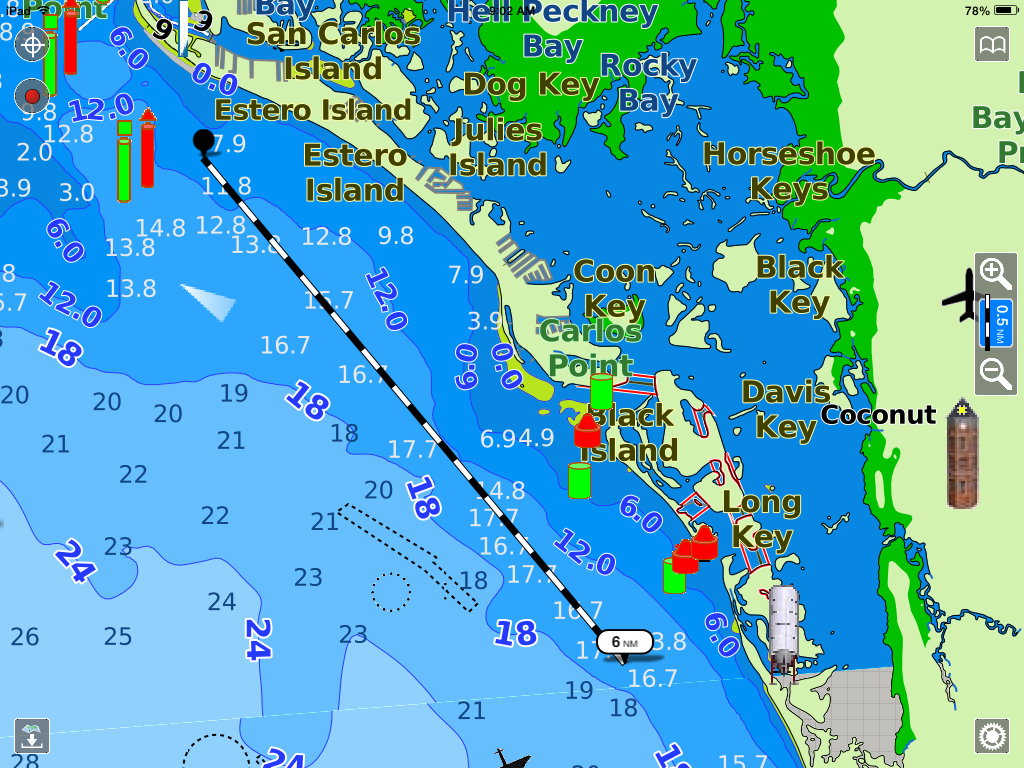
Aqua Maps is the one of the latest apps to join the long list of marine charting apps. At this point it is a pretty basic app with chart display, waypoints, tracks and GPS tracking.  I like what I see so far and I know the author has big plans to add additional features in the future.

 Features:
  • Offline Charts, satellite and Street hybrid views
  • ENC Charts for US, Alaska, Hawaii and USACE Rivers, New Zealand, UK&Ireland, Germany and Rivers
  • Netherlands, Belgium and Canals
  • Center map button
  • Spot sounding, Buoys, Beacons, Sea Floor information, Obstructions, Wrecks, Rocks, Dredges areas Fishing zones
  • Download detailed map by tile
  • On screen zoom controls or use pinch to zoom in
  • Add, modify and delete customized Markers
  • Display or no display of markers
  • Import of KMZ and KML tracks and markers
  • GPS Track recording
  • Marker coordinates
  • Sharing of markers, tracks and position through Air Drop, texting, Facebook and Email
  • North Up and Track up orientation
  • Track detail
  • Custom track colors
  • Distance measuring tool
  • Speed, maximum and average
  • Heading
  • Moving time
  • Distance
Charts:

The first thing you will want to do is download some charts for the area you want to view. The Chart download icon is located in the lower left of the screen. Tapping this will bring up a chart display with a grid overlay. Simply tap the tiles you want to download and tap the icon at the bottom to start the download process. You will want to be connected to WiFi at this point or it may take a while to download all the data.  To remove the chart data from your device, go to settings and Reset the Downloaded Map option.  You can now zoom in and display the detail for the area you downloaded.

The main display is very fresh looking with many markers and symbols. The color of the charts are very vibrant and clear. Depth gradients are shown with multiple colors to easily navigate shallow waters. Cities and towns are marked for easy location. The test size of the annotations seems too large and interferes with navigation at times. It might be nice to have a setting to make the text smaller or the option to turned it off all together.

There are a ton of symbols on the charts. Aqua Maps has more symbols than any other charting app that I have seen. A complete list of them can is seen here.  The symbols appear at times to be too big in size and also interfere with navigation. Options to control the size of the symbols would be a welcome addition also. 

The main display has several control features to run the app. The first two buttons are located in the upper left side of the screen. Tapping the top Crosshairs icon once will center the chart on your current position. Tap it again to enter the track up mode. Tap it again to go back to north up chart orientation mode.

The GPS icon below that is used to start and stop GPS tracking of your position. Once selected, a pop up box opens at the bottom center of the display.  It will start recording your track on the display and provide Speed, Heading, Average speed, distance travelled and time travelled.

The track display box can be selected to bring up the Track edit feature. Here the user can edit the route name, color or delete the route. Additional information about the route is displayed including the date, time and trip information. You can share your route through the email option.

The Settings icon is in the lower right of the screen. Select this to access options for Chart overlays, Measuring units, Depth, Compass heading type and sounds.  The chart overlay options lets you change the land background to a satellite view or a street map.  This is handy to orientate yourself to city, street names and landmarks.

A handy Scaling icon on the center right of the screen allows zooming in and out of the display.

Tapping this in the center will bring up a Measuring tool which can be use to measure distances between to points on the chart. Simply place your finger on either end of the measuring line and drag them to the desired locations.

The distance will be displayed on one end of the line. A nice addition to this feature would be to also have the compass bearing of the line displayed also. By dragging one end of the line to your present position, the user can quickly make distance measurements and estimate the course to steer to a point on the chart.


The last icon on the screen in the upper right corner lists the chart data including Tracks and Markers. 

Tap any of these markers or tracks to enter the edit mode. Here you can customize the marker points to a variety of colorful icons. Tapping the Checkered Flag on a marker will put you into the navigating mode to that waypoint marker.

Markers are easily added to any point on the chart by simply tapping and holding on a location. A pink star will be then added to that point.

Tap the Marker you just made for more options. Select the checkered flag to make it your destination or select the garbage can to delete it. Tapping the center will take you to the edit mode where you can select the customized icons.

The app is very intuitive and easy to use. The chart colors are vivid and the symbols seem to pop off the screen. All the features make sense and can be quickly accessed through the on screen icons and menus.  With the addition of the few of the changes that I mentioned the app will become even more user friendly.  I look forward to the next version of the app and expect the author will continue to build on the already very functional app.

Well, I hear my wife calling, I think she needs me to sample some of her cooking. I am the designated taste tester, lucky me. Wish me luck in making it through all the madness of the holidays.  I want to thank you all for being my loyal follower and reading my blog.  I hope in some small way I have helped you understand these amazing apps.

I hope you have a "HAPPY HOLIDAY SEASON" and wish you and your family the best in the new year!

~~~ Sail On ~~~ /)

Mark


Baca Selengkapnya ....

BEST Books for Younger Challenged Readers (Ages 4-8)

Posted by Unknown 0 komentar
The last article in a series of 3 (different age groups)

As the holiday season draws to a close, so does our series of three articles here with book lists and resources for challenged readers in various age groups. We thought that providing this information at this time would help parents and teachers discover books for gift giving to reluctant or struggling readers.

This last article is intended for younger readers (age levels provided with each selection). Some of the books listed are geared toward children who daily experience the challenges of dyslexia. Others touch on more general reading problems. One book even deals with bullying, which is an issue that, unfortunately, many students face in our schools today. At the end of the resources list, you’ll even find a link to a site that offers FREE e-books, which can be very helpful to young challenged readers (as e-readers and other tech devices for e-books can help diminish visual stress experienced by some challenged readers.)

We hope you’ll agree that each of these selections offers more than just one more book for a child to read. They each have something “special” to offer a young person whose self-esteem is at stake because of a struggle to read.

Happy reading---AND Happy Holidays, dear readers!

BEST Books for Younger Challenged Readers

Tacky the Penguin---by Helen Lester & illustrated by Lynn M. Musinger (ages 4-8)
This delightful tale of an odd penguin that doesn’t fit in with the “perfect” penguins in his colony is well suited to budding out-of-the-box thinkers who often do things differently from their peers. Stories give children a way to think positively about themselves and Tacky is a hero for children who struggle with differences. A Read-Along Book/CD combo is also available.
http://www.amazon.com/Tacky-Penguin-Helen-Lester/dp/0395562333/ref=sr_1_fkmr0_1?ie=UTF8&qid=1386290429&sr=8-1-fkmr0&keywords=Tacky+the+Penguin---by+Helen+Lester+%26+illustrated+by+Lynn+M.+Musinger

It’s Called Dyslexia---by Jennifer Moore-Mallinos & illustrated by Nuria Roca (ages 4-7)
Whoever said that learning to read and write is easy? The little girl in this story is unhappy and she no longer enjoys school. When learning to read and write, she tries to remember which way the letters go but she often gets them all mixed up. After she discovers that dyslexia is the reason for her trouble, she begins to understand that with extra practice and help from others, she will begin to read and write correctly. At the same time, she also discovers a hidden talent she never knew existed!
http://www.amazon.com/Called-Dyslexia-Live-Learn-Books/dp/0764137948/ref=sr_1_1?s=books&ie=UTF8&qid=1386286193&sr=1-1&keywords=It%E2%80%99s+Called+Dyslexia---by+Jennifer+Moore-Mallinos

Thank You, Mr. Falker---by Patricia Polacco (ages 5-8)
"This story is truly autobiographical. It is about my own struggle with not being able to read. This story honors the teacher that took the time to see a child that was drowning and needed help...Mr. Falker, my hero, my teacher, not only stopped this boy from teasing me, but he also noticed that I wasn't reading well and got a reading specialist to help." -Patricia Polacco
http://www.amazon.com/Thank-You-Falker-Patricia-Polacco/dp/0399257624/ref=sr_1_1?s=books&ie=UTF8&qid=1386287339&sr=1-1&keywords=Thank+You%2C+Mr.+Falker---by+Patricia+Polacco

The Alphabet War: A Story about Dyslexia---by Diane Burton Robb and Gail Piazza (ages 7-10)
"When Adam was little, he loved to sink into his mother's warm lap and listen to her read." Yet, reading becomes a frustrating, daily battle once Adam starts school. Finally, in third grade, Adam learns that he has dyslexia...and begins a journey back to enjoying reading.
http://www.amazon.com/The-Alphabet-War-Story-Dyslexia/dp/0807503029

FREE e-Books for Young Readers---from Pearson Education, Ltd. (for Primary Grades)
Everyone deserves a rest when they’re at home, but it’s also important for children to keep up with their reading practice if they can. To help make reading fun at home, this resource provides FREE access to a range of e-books for teachers, parents and children. No sign-up, no login, no fuss. http://www.pearsonschoolsandfecolleges.co.uk/Primary/GlobalPages/BugClubReadingChallenge/BugClubReadingChallenge%20-%20Teachers.aspx

Sources:

Young People’s Books Focusing on Dyslexia
http://dyslexia.yale.edu/EDU_YPbooks.html

Finding FREE Kids Books Online: Holiday Edition!
http://www.kcedventures.com/blog/free-kids-holiday-and-christmas-books-online

For information on customizable reading tools:
www.FocusandRead.com Tools for struggling readers of all ages!
www.BrennanInnovators.com Info & support for struggling readers
314-892-3897

Image courtesy of: Brennan Innovators, LLC at www.focusandread.com

Baca Selengkapnya ....

Micromax Canvas 4 A210 All in One - ROM, ROOT, Custom ROM/Recovery, Flash Tool etc.

Posted by Unknown Jumat, 20 Desember 2013 0 komentar

Presenting Micromax's Canvas 4 A210's Stock ROM, Rooting Kit, Custom Rom, Custom Recovery, Flash Tool, IMEI writing tool etc. with Instructions..

Dear Readers, I'm now Sharing with you guys Micromax's Canvas 4 A210's AIO (All in One) Kit... As you may already know that Rooting VOIDS Manufacturer's Warranty for your device, So kindly proceed at your own risk.. 

Reclaim your warranty :
You can always Re-Claim your Warranty back by Flashing Stock Rom on your Canvas 4... You can find detailed report later in this post..

How to Flash Stock Rom:
Things You'll need to Flash your device and Reclaim Warranty
Instructions: 
  • Download the Stock Rom File and SP Flash Tools...
  • Extract the contents of the Stock Rom and SP Flash Tool
  • Install the Drivers downloaded from above, if already installed proceed to next step.
  • Run Flash Tool.exe file with Administrator Rights (Run as Administrator)
  • Now you'll see 5 file options, click the "scatter loading file" and point towards the location where you just extracted your Stock ROM..
  • Select the "MT6589_Android_scatter_emmc.txt" file..
  • Check the option "DA DL All with Checksum"..
  • Don't connect your device to your PC right now and Just Shut Down your Device until it Vibrates.
  • After this has been done, Press the Download button on SP Flash Tool running..
  • Flash Tool will then Start Looking for attached devices, just then plug in your Device, You'll see Red bar Finishes followed by a purple bar.. Yellow bar will show your overall progress of writing..
  • A Green Circle with OK will be displayed to confirm the successful Flashing of ROM.
  • That's it.. Now just Turn your Canvas 4 Back ON.. You are now covered under your warranty period
Flashing Custom Recovery CWM (ClockWorkMod) :
  • Follow the above procedure for Flashing Stock ROM but just Replace the Stock Recovery Image with Custom Recovery Image..
  • Leave all fields as it is and click on Recovery and Select the Recovery.img Provided here under the post and Replace it with provided one.
Alternate Method for Flashing Custom Recovery(Requires ROOT Access):
  • Place the Provided the Recovery.img on your SD Card and Download MobileUncle MTK Tools (Root Required) from either Google Play Store or from here..
  • Select to Flash Custom Recovery from with in the MobileUncle MTK Tools..
  • You are DONE.. !!
Rooting Your Canvas 4 (Proceed Only if you understand the Risk, Advantages & Disadvantages of Rooting)
  • Download the Rooting kit and Extract the contents to any folder.
  • Connect your device to PC in MTP Mode & USB Debugging Enabled Mode. Turn USB Debugging ON from Developer Options of Settings (Settings>Developer Options>Enable USB Debugging - Go to Settings>About Phone>Tap 7 times on build number until a toast is displayed "You are now a developer" to Show Developer Options in Settings on Android 4.2+)
  • Double Click the RunMe.Bat file and wait for exploit... (Note: USB Debugging and Drivers required in order to push exploit and SuperSU.apk)
  • Your device will Restart Automatically & You are good to go now... Open SuperSU or SU you'll find in your application drawer...
  • Enjoy the Power of a Rooted User.. !!

To be Continued . . .

Tags: micromax canvas 4 a210 rooting, super user access, custom rom, c4, mmx, how to enable usb debugging, stock rom, flashing, cwm recovery, clockworkmod recovery, twrp, drivers, how to unbrick your device, unbrick soft bricked mmx micromax canvas 4 a210,

Baca Selengkapnya ....
Trik SEO Terbaru support Online Shop Baju Wanita - Original design by Bamz | Copyright of android jelly bean update.