Tampilkan postingan dengan label How to. Tampilkan semua postingan

10 Creative Ways To Make Money Online

Posted by Unknown Rabu, 05 Februari 2014 0 komentar
If you’d claimed it was possible for the average guy on the street to make millions of dollars online just a decade ago, the chances are good you’d have heard nothing but laughter in response. Today, though, there are countless Internet millionaires who turned a great idea into obscene profit, used the power of the web to promote their offline business or simply worked their butt off to sell their skills online.
While it’s unlikely that you’ll ever earn enough to buy your own private island, there’s nothing to stop you from using your skills to make a comfortable living online. In fact, while the media would have you believe that online success stories are limited to just a few lucky, hard working people who stumbled on a great idea that went on to make millions, the reality is that there are tens of thousands of people who make a living exclusively online. Here are just ten ways you can join them.

How To Make Money Online 

1. Sell Stock Photography

Sell Stock Photos OnlineThe Internet has caused an explosion in the demand for stock photography. As the number of media and commercial outlets has increased dramatically with the growth of online media there’s an enormous need for high quality stock photos.
Yuri Arcurs is the man everyone turns to for their stock photo needs. As the world’s top selling stock photographer he sells an image every 8 seconds, 24 hours a day (that works out to over 4 million images each year). Arcurs makes millions of dollars each year simply by being the best at what he does. There are lots of great photographers in the world and the barrier to entry is as low as ownership of a camera, but Arcurs has managed to build a reputation online for consistent, high quality and imaginative images.
If you’re a professional photographer (or even just a hobbyist) you should consider the possibilities of selling stock images online.

2. Tweet For Sponsors

Sponsored TweetsSponsoredTweets.com is an online platform that allows you to make money on Twitter by charging sponsors for communicating their advertising messages to your followers. You set the amount you want to get paid for every tweet you make, choose a category and select keywords you want to work with. You then wait for advertisers to contact you and take you up on your offer, paying you the amount you specified for each tweet that you make.
All throughout the process, the tweeter has full control over his or her account, and may choose the wordings of the tweets, or may choose to reject the tweet altogether.

3. Blog for Ad Revenues

Google Adsense Money OnlineIf, however, you already have a blog with a devoted following it should be easy for you to leverage your readers into hard cash. Ad networks such as Google AdSense pay big money to place their ads on your site, and you’ll receive a payment every time a reader clicks one. While it’s easy to go overboard and fill every spare pixel, if you place your ads well it’s possible to make a comfortable income from your site.
One of the most successful bloggers around today is John Chow, a Canadian blogger who makes more than $40,000 a month through ad sales and other revenue streams. Ironically, his blog is about ways to make money online.

4. Sell Affiliate Products

Affiliate marketing money onlineIf you have a flair for sales copy you could try your hand at selling products for affiliates. While many people take the seedy route of selling diet pills and penis enlargement products, if you want to keep your conscience clear you’ll find that Amazon runs a very successful affiliate program that allows you to make money advertising any of the products for sale on their site. eBay also have a pretty good affiliate setup, with their top affiliates earning $1.3 Million a month, WOW!


5. Write an e Book

make money sell ebook onlineIn recent years the self-publishing world has exploded online to the point at which you don’t even have to run your own site in order to promote a book. Amazon, Barnes & Noble and Kobo are just a few of the sites on which you could self-publish today, with commission rates of around 70% available on every sale.
The number of eBooks on Amazon reached 8 million last year, and Amazon stated that eBooks are outselling hard backs 2 to 1, 62% of ebook sales fell into the Thriller and Mystery genre, so if you feel that you could pull this style of genre off then you will be in for a good chance of sales.
26 year old self published author, Amanda Hocking from Minnesota makes more than $2 Million a year from her ebook sales. Amanda Hocking’s stories about, trolls, vampires and zombies and  ‘supernatural teen romances’ sell for $2.99 or for as little as $.99.

6. Become a Virtual Assistant

Virtual AssistantEvery small businessman would love to hire a full time assistant to take care of the little things, but many simply can’t afford one. Thanks to the Internet, though, they can now hire part time assistants who work for a whole host of clients, and all at a much lower cost than a full time staff member.
If you work from home this may be a perfect opportunity to make a consistent income. Virtual assistants can earn $20 an hour in return for booking travel tickets, interacting with clients and dealing with the daily needs of small businesses.

7. Lease Your Skills

make money online outsourceMost people have at least one skill that carries a market value, though until now that skill may have been impossible to monetize in the traditional job market.
Sites such as 99Designs, Elance, Freelancer and iWriter allow people to hire out their skills as writers, coders, designers, translators and lots more on a contract basis. Freelancing sites are a great way to boost your income in your free time, and with enough motivation and hard work you could find yourself earning a comfortable full time income from them.

8. Selling on eBay

Make Money On eBayeBay is a great way to turn your unwanted things into a little spending money, but it isn’t just a place to sell your old Star Wars action figures. In fact, eBay’s global marketplace can offer a great way for canny traders to buy and sell their way to profit. By buying wholesale you can sell anything with a mark up. Even better, if you have the skills to make things people want to buy you could start your own home-based craft business, selling to customers around the world.
Matt & Amanda Clarkson are a successful couple who so far have managed to make over $8 Million in eBay sales.

9. Become A Mobile App Tester

test iphone appsPeople that are rather uncertain of their application development potential can still make some money through the usage of iPhone apps.
People that have the time and desire to test iPhone apps and discover bugs can be rewarded payments for their efforts. uTest is one such application. Individuals that have signed up will also build some reputation on the basis of the testing they have done so far.
Better reputation signifies access to more profitable app testing opportunities.

10. Designing T-Shirts

design tshirt make moneyFinally, if you have something of an artistic streak you could kick off the next viral sensation with your own range of funky, arty t-shirts. Sites such as CafePress allow users to upload their own t-shirt designs and sell them on their personal online store.
You can also contact distributors such as threadless.com or designbyhumans.com to release your t-shirt designs to the masses.
If your designs catch the eye you could be looking at enormous profits when they take off in a big way.
BONUS:
Or, you can go this route and sign up to Isagenix. A number of my friends have left their jobs and are making a 6 figure salary just by building a team of motivated Entrepreneurs to share this awesome product.
My fiance’ “Charlene” and I have taken the products ourselves and we are getting incredible results. I used to be fatigued and stressed, I also struggled at the gym to gain strength and lose my gut, but it all changed once I started using their amazing performance and cleansing packs.
Click the link below to watch a cool video on how you can make awesome money and great health a part of your life today with our team.
make money banner

Conclusion

As you can see, to make money online you don’t have to be particularly skilled with computers. You don’t need to be know how to build your own website from the ground up, and you don’t have to be a mogul with millions of dollars to invest in success. If you have any kind of artistic skills, creativity or business savvy you can turn it into profit.
In short, you should understand that the online world is just like real life. The same opportunities are there for the taking, but instead of drawing your customers from just your home town you can reach out with your great ideas to the far reaches of the earth.
So why not start today?

Baca Selengkapnya ....

How to Increases download speed of µTorrent?

Posted by Unknown Selasa, 04 Februari 2014 0 komentar
µTorrent is a powerful and efficient Bit Torrent client that allows you to download Torrent files directly. µTorrent is the best Torrent client that offers much greater download speed as compared to other Torrent clients. But some people are not satisfied with its downloading speed. If you are one of them then read this article, today we are going to share some tricks and tweaks which helps you to get maximum downloading speed on µTorrent. In this tutorial we will tweak the default settings of µTorrent which makes the download faster.
                                                                        
Increases+u+torrent+download+speed

Steps to Increases downloading speed on µTorrent

First of all make sure you have the latest version of µTorrent. If you don’t have then Download µTorrent and install it on your PC and then follow the below steps. 

Change Connection Settings

  • Open µTorrent and Go to Options and then select Preferences (Options -> Preferences).
  • A new window will appear and click on Connection from the left pane of the window.
  • Change the default Random Ports Value to 45682.
  • Now Uncheck Enable UPnP port mapping.

change+connection+settings
 
Also Read: How to download torrent with IDM

Change Bandwidth Settings

  • Now click on Bandwidth.
  • Change the value of Maximum upload rate to 10.
  • Change the value of Global maximum number of connections to 2329.
  • Change the value of Maximum number of connected peers per torrent to 1890.
  • Change Number of upload slots per torrent to 14.
Bandwidth+setting

Change Bit Torrent Settings

  • Click on Bit Torrent.
  • Now change Protocol Encryption outgoing from Disabled to Enabled.

bit+torrent+setting

Change Queuing Settings

  • Click on Queuing and made this changes.
  • Change the value of Maximum number of active torrents (uploads or downloads) to10.
  • Change the value of Maximum number of active downloads to 10.
  • Change Minimum ratio (%) from 150 to 0.

queuing+setting

Baca Selengkapnya ....

Tricks to increase Firefox browsing speed | Speed up Firefox |

Posted by Unknown 0 komentar
Mozilla Firefox is one of the best browser of all time and most of the internet user use it for browsing internet .To be frank it is the safest and fastest browser among all browser. It is known for speed browsing, good uploading and downloading speed. But some times it gets fail and experiences slower browsing speed. This is generally happens using older version or using Firefox over time. If you are experiencing slower speed from your favorite browser, then read this article because I have gathered some tweaks and tricks to increase Firefox speed and today I am going to share with you. After applying this tricks you can get dramatically improve of your Firefox browsing speed. This is a simple trick and can be done by any person. So don’t be scared just follow the steps.
increases+firefox+browsing+speed
                                                                   

Steps to Increases Mozilla Firefox Browsing Speed

Change Firefox configuration

                                             Enable Pipelining
  • Open Firefox and type about:config in the address bar of Firefox and press Enter.
  • Now you can see a warning massage will popup, just ignore it and click on I’ll Careful, I promise.
  • Now type network in the search field and press Enter.
  • After that navigate these below entries and just double click on them to set their value true.
Network.http.pipelining
Network.http.proxy.pipelining
  • Now navigate Network.http.pipelining.maxrequest and set it value to 15. That means it will make 15 requests at once.
  • Now Right click anywhere and select New and click on Integer. Enter the preference name as nglayout.initialpaint.delay and set it value to 0. This value is the amount of time the browser wait before it receive information.
  • After that create some other entries by following above method. The entries are
network.dns.disableIPV6 and change its value false.
content.notify.backoffcount and change its value 5.
plugin.expose_full_path and change its value true.
ui.submenuDelay and set it value 0.
                Reducing Amount of RAM Firefox uses for its Cache
  • Open Firefox and type about:config in the address bar of Firefox and press Enter.
  • Now find browser.sessionhistory.max_total_viewer and change its value to 0.
                Reduced Amount of RAM when Firefox is minimized
  • Open Firefox and type about:config in the address bar of Firefox and press Enter.
  • Now Right on anywhere and select New and click on Boolean.
  • Enter the preference name as follows config.trim_on_minimize and click on ok.
  • Now select true and click on OK.
  • After doing all of this you must be restart your Firefox.

Clear Cookies

Cookies, cache, history and other temporary files also decrease the speed of Firefox. So cleared them by following method. 
  • Open firefox and click on option and then security
  • Now chose clear resent history to remove all Cookies, cache and history.
  • You can do that by pressing Alt+Shift+Del.
If you apply all the above method on your browser then you must be get 2-3 time better browsing speed on Mozilla Firefox. If you have any doubt then feel free to ask

Baca Selengkapnya ....

How to Reveal/View Password Hidden under Asterisks? Simple way

Posted by Unknown 0 komentar
Most of the browsers have capability of remembering the user name and password which helps us to login more quickly in our favorite sites like Facebook, twitter, Gmail etc. with the help of this features you don’t need to type user name and password every time when you want to sign in to your favorite site. Since you are not typing your password anymore and thus you will forget your password in few days and then you cannot reveal or predict the password, because of security reason the password field of all browsers are masked with asterisks or dots which would not allows anyone to see original password even user. So cannot know or reveal the password by simply looking at the browser password field. But there is couple of way to reveal the password hidden under asterisks in your web browser and in this article we are discussing about how to reveal/view password hidden under asterisks in web browser.
                                                         
View+hidden+password

Steps to Reveal/view Password Hidden under Asterisks

Mozilla Firefox and Opera

For Mozilla Firefox and Opera browser you can reveal or view password hidden under asterisks by using inbuilt Inspect Element features of the browser. So follow the steps below
  • Open the site that ask you to sign in (Facebook, Gmail) and where your user name and password already remembered by the browser.
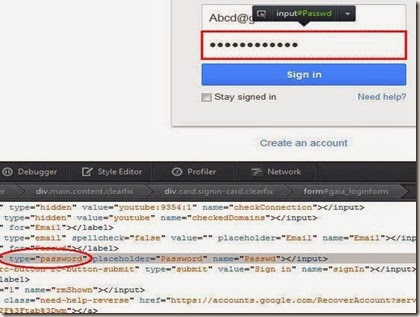
  • Now Right click on Password field of browser and select Inspect Element.
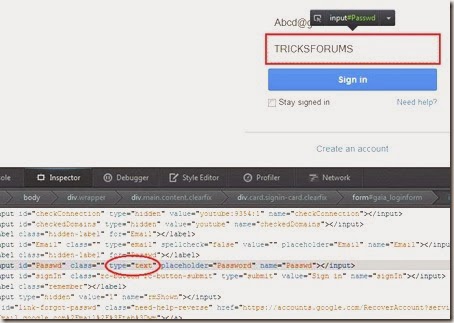
  • After that Inspect Element will open where you will see HTML code and here just find the wordPassword and replace with the word text.
                              replace%252520password%252520with%252520text%25255B8%25255D
  • Now it will reveal the password hidden under asterisks in the password field of the browser.
                         reveal%252520the%252520password%25255B11%25255D

Google Chrome

In case of Google Chrome you can reveal the hidden password by using above method.
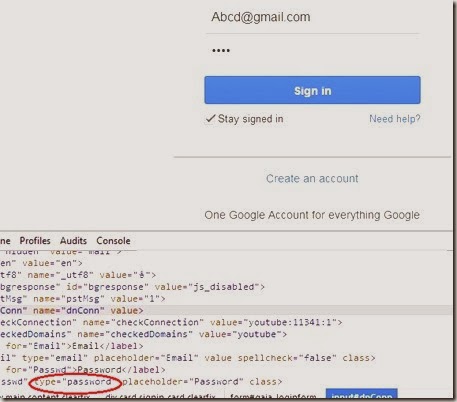
  • Open the site and Right click on Password field of browser and then select Inspect Element.
  • After that Inspect Element will open and just find the word Password and replace with the word text in the HTML code and it will show you the hidden password under asterisks.
                    chro%25255B12%25255D
Also there is another way to revel the hidden password by using JavaScript which is quite simple and easy.
  • Open the site’s login page where you password is already remembered.
  • Now copy the blow code and paste it in the address bar of your browser.
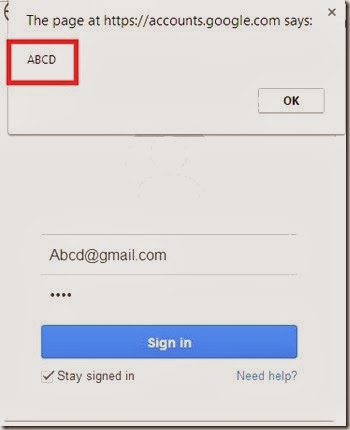
JavaScript: alert(document.getElementById('Passwd').value);
  • After entering the above code in the address bar, hit Enter and a popup window will appear where your password written on it.
                                         javascript%252520reveal%252520password%25255B8%25255D

Internet Explorer

In case of Internet Explorer you can reveal the hidden password in the same way like Mozilla Firefox and Google Chrome.

Conclusion

There are so many ways to revel or view hidden password under asterisks in web browser, but the above method are safe and best. Also you can use third party tools to reveal hidden password, but if you use third party tools then anyone can reveal the password using same way, have permission to access your computer.
We hope you like this ,if so then share with your friends

Baca Selengkapnya ....

Skip Levels in Candy Crush Easily - Candy Crush Cheat Codes

Posted by Unknown Senin, 03 Februari 2014 0 komentar
Many people play Candy Crush and they know how frustrating certain levels can be. Paying for powerups and more lives can really add up so we have designed and coded a candy crush cheat to skip candy crush levels. It is very simple to do, follow the steps below.


Steps to follow: 


Step 1. Open the candy crush app to the current level that you are stuck on. Then press the home button so it minimizes candy crush.

Step 2. Open the internet on your phone and navigate to  This Link The "Skip Current Level" Button will now be enabled and you can continue to the next step.

Step 3. Click the "Skip Current Level" Button and let our system detect your candy crush level to skip.

Step 4. You will be asked to download and play a free app to skip the level, this is to ensure our level skip works correctly. We use an advanced appstore exploit to do this.

Step 5. After you download and play the free app for 30-60 seconds, candy crush will popup and your level will be skipped. You will now be on the next level!

Enjoy this awesome trick and in our upcoming article you can see tricks on how to get more life in candy crush saga.

Baca Selengkapnya ....

Find Your Own Mobile Number In Aircel, Idea and Uninor

Posted by Unknown Rabu, 22 Januari 2014 0 komentar
Sometime we forget our own number or purchased a new SIM and don't know our own number. We feel it difficult to find the number. To get rid out of this difficulty we are sharing the USSD codes of different operators to find our own number. It happens many time that one Sim may have different codes. So you if are dialing a code and you are not getting your mobile number then try another one.

Check Your Own Mobile Number In Aircel


USSD codes to find own number in Aircel

  • *122*131#
  • *888#

Check Your Own Mobile Number In Idea


USSD codes to find own number in Idea

  • *147#
  • *1#
  • *789#
  • *131*1#

Check Your Own Mobile Number In Uninor


USSD codes to find own number in Uninor

  • *555#
  • *1#
Well with this USSD codes you can easily find your own number in Aircel Idea & Uninor SIM cards.


Baca Selengkapnya ....

Check 2G/3G Internet Data Balance in Airtel, Tata Docomo and Idea

Posted by Unknown 0 komentar
We all use Internet service on our mobile whether it's 2G or 3G. Some times we feel our data balance is getting low and want to check our data balance. But I have seen that many people face difficulty to check their remaining Internet data pack because they don’t know how to or codes to check remaining net balance. There are different numbers for different SIM Cards to check Internet pack or remaining data. So here I'm sharing the USSD codes to check Internet data balance.

Check 2G/3G Internet Data Balance In Idea


If you are using Idea SIM and want to check your remaining 2G or 3G data balance, simply dial *125# to check your 2G and 3G Internet data pack balance.

Check 2G/3G Internet Data Balance In Airtel


Dial *123*10# or *123*6# or *123*11# to Check 2G & 3G Internet data Balance in Airtel. However the codes are different for different circles.

Check 2G/3G Internet Data Balance In Tata Docomo


 You can check your Tata Docomo remaining data of Internet pack by dialing *111*1#.

I hope these codes work for you and you can find your remaining balance of your Internet pack.


Baca Selengkapnya ....

How To Record Your Desktop Screen Online For Free

Posted by Unknown Selasa, 21 Januari 2014 0 komentar
Sometimes we perform several activities on our desktop and we want to record them to share with others as a video file. For example, any of your friend asked you for a question that how to view forgotten WiFi password? Then you can record the whole procedure to view forgotten WiFi password and share this recorded video with related friend.


As usually several professional bloggers and YouTube users use the different desktop screen recording software but with this article you won’t need any type of software. You just need to visit a website and you can record your desktop screen and share it on YouTube. For your information let me tell you that the relevant site enables you to record your desktop screen for 5 minutes only. So, in my opinion the time is enough to make a video of your activities on desktop.


How To Record PC/Laptop Screen Online


Now, I move on the steps to record your desktop screen online for free. So, have a look on the following steps -

1) Visit the website www.screenr.com and Click on Record button to start recording your desktop screen.


 2) After Clicking on Record, it will start recording after detecting Java on your computer.


Note : If Java is not available on your PC, it will ask you to download Java. Click on Free Java Download button to download Java on your PC. After downloading Java, if will start recording.

3 )When you’ve done your recording, Click on Done and share your video if you want.

That’s all friendss! I think that none other than screenr can provide you such instant and private screen casting for free. It’s pro version is also available. You can get the 15 days free trial of its pro version.

Baca Selengkapnya ....

How to Create your Own Operating System - Linux in Simple Steps

Posted by Unknown Selasa, 31 Desember 2013 0 komentar
Linux the powerful operating system is used every where in the technology and Linux operating system is ruling the tech world. Linux operating system are giving tough competition to the Windows Operating systems and the MAC Operating system. The reason that make Linux to stand first is its features. As Linux is open source, any one can build and modify the existing powerful Linux operating systems and share with any one for free.
create+our+own+linux+os
How would that be if you too can build a powerful open source Linux operating system which meets all your needs. It sounds awesome right? But building a Linux operating is not that easy without knowing the coding and proper plan. Don't worry you can also build the open source Linux operating system without knowing any coding! with the help of SuseStudio. 
Here in this post we are explaining How can you Create your Own Linux OS in Step by Step Process
  • First open create an account with www.SuseStudio.com
  • You can create account on susestudio with Facebook,twitter,Google account and with other social media accounts too.
login
  • Once your account is created then open the Home tab. Where you need to select properties of the base template for your new Linux operating system. The base template determines the operating system your appliance is based on. And you can also select the architecture of your operating system 32 bit or 64 bit from here.
linux
  • If you are a beginner select the Gnome desktop as shown in below image and if you know the articuture of your computer then you can select 32 bit or 64 bit. If you don't know about the articulate of your computer then you can leave it to the default value 32 bit.
  • After completion of above steps you can step forward and add the required software to your new Linux operating system by clicking on the "Create Appliance" button.
  • Now you can select the software to be added to your Linux operating system.
  • If you select any software to be included in your operating system which doesn't have the supporting software then Suse Studio will show you a error message and will also show a remedy or supporting software to active the function of the software that you wished to install on your computer.
  • The software will be included from the official sources, so you need to worry about any virus or malwares on your operating system.
  • Next in the configuration tab Open General settings and upload the logo of your own operating system.
  • Next in Start-up tab you can add your license terms and conditions on your operating system. Note you can't restrict your users from the open source terms and conditions.
linuzx2
  • If you know what you doing then you can play with the other settings in the configuration and then click on build and then select the format of your operating system. By default you the USB/ Hard disk image is selected it is best format which can let you to make your Linux computer portable.
linux+4
  • After selecting the build format you can click on BUILD button to start creating the format.
  • After completion of build you can test drive the operating system on online itself.without downloading the image copy.
If every thing goes correct you can download the your operating system and run on your computer.

Baca Selengkapnya ....

mSpy - The Best Mobile Tracker to keep a Vision on Anyone

Posted by Unknown Jumat, 27 Desember 2013 0 komentar
If you are looking for mobile monitoring software that can provide you piece of mind, then mSpy application is a good choice for you. Having seen its wonderful features and tracking abilities you will also pay a good word in favour of this mobile spy
mspy+review
Mspy application does not have any type of compatibility issue if you want to install it on a smartphone. It is compatible with Blackberry, Android, iPhone and Symbian operating systems. In addition to this if you have any kind of issue related to compatibility, you can visit their website which has a complete list of phones and their models on which you can use this application.clip_image001

mspy+for+your+mobile
It is considered as a standard that software is allowed on one phone per license but mSpy will let you use the application on more than one phone. Before you take all these advantages you have to make sure that mSpy application is installed on mobile phone. However, if you are installing this application on a person’s phone, make sure that you follow privacy laws. If you are not good at law, it would be better for you to consult with an attorney before you install the app on a phone.
Mspy application has a variety of features for its users. It can monitor and track all the phone calls that were made or received through phone; moreover you can block any incoming or outgoing call. If the app is installed on your target person cell phone, you can read all the text messages sent or received
clip_image003
call+logs+mspy
Such kind of feature is useful if you have any kind of doubt related to your children or employees mysterious activities and whereabouts. It also allows you to see the browser history and emails; you can track the target person with mSpy GPS tracking features. For concerned parents who want to know about their children activities where they go after school this app will be a right choice. In addition to this, the app tracks instant messengers, has the keylogger feature that allows you to monitor every keystroke within a phone. All this can be viewed from the online control panel and you will remain undetectable.
clip_image005
The application also helps you a lot if you are fed up with paying the bills of those unnecessary applications that your children install and web-site they visit. mSpy gives you an ability to monitor the apps that are installed on a cell phone, all the sites they visit and block them.
clip_image007
block+calls+and+webistes
The cost of mSpy software depends upon the time period for which you intend to use the service. In addition you can have a 7-day trial to be sure that all the mSpy company claims to be in the app is not a scam.

Baca Selengkapnya ....
Trik SEO Terbaru support Online Shop Baju Wanita - Original design by Bamz | Copyright of android jelly bean update.